Not every action a user takes in an application carries the same risk. Viewing an account balance in a banking application isn’t the same as wiring several thousand dollars to a new payee. In practice, though, many applications ask users to prove their identity once at sign-in and then treat every action the same from that point on, whether that sign-in used a password alone or included multi-factor authentication (MFA). That creates a tension: if the sign-in is strict enough for the most sensitive operation, everyday tasks carry unnecessary friction. If it’s easy enough for everyday tasks, the most sensitive operations might not be protected well enough. Even a strong sign-in from hours earlier says little about who is at the keyboard when a high-risk request arrives.
Amazon Cognito now resolves that trade-off by supporting step-up authentication, which records the authentication assurance level and the methods used, and including both in the JSON web tokens (JWTs) it issues. You ask for a target assurance level when a user signs in. Amazon Cognito returns the level the user reached in an acr claim (authentication context class reference) and the methods they completed in an amr claim (authentication methods reference). These claims are part of the OpenID Connect Core specification, so your application can reason about authentication strength in a standard way and match it to the potential risk of what the user is trying to do. In this post, I explain how the claims support step-up authentication and walk through four patterns that put them to use: transaction-level step-up in a banking app, varying risk postures across a portfolio of applications, step-up enforced on API and SDK sign-in, and authentication assurance carried across a federated third-party OpenID Connect (OIDC) identity provider.
You can request authentication levels through Amazon Cognito managed login using the standard OIDC acr_values and max_age parameters, and through the SDK and API using the USER_AUTH flow with TARGET_ACR_VALUES and MAX_AGE. Requesting step-up authentication requires the Essentials or Plus feature plan. ; For the complete list of features, behaviors, and limitations, see the Authentication levels with ACR and AMR claims.
What ACR and AMR tell your application
Amazon Cognito defines four assurance levels, and the factor combinations that satisfy each one are fixed. You can use the default names as is or rename the level URIs to fit your organization’s own naming scheme. Renaming changes only the label. If you need to relate Amazon Cognito levels to a framework such as NIST SP 800-63 or eIDAS, make that mapping in your application. The following are the default Amazon Cognito defined levels.
- Level 1 (
urn:cognito:loa:1) is password only. - Level 2 (
urn:cognito:loa:2) is a single one-time password (OTP) over SMS or email. - Level 3 (
urn:cognito:loa:3) is a passkey on its own, or a password combined with an SMS or email OTP. - Level 4 (
urn:cognito:loa:4) is the highest: a password with a time-based one-time password (TOTP) code from an authenticator app.
Amazon Cognito assigns the highest level the user’s completed factors fully satisfy, so a user who signs in with a password and a TOTP code lands at level 4, even though they also met the assurance requirements for every level below it.
Four claims in the token facilitate a step-up decision. The acr claim is the level the sign-in reached and is what your application compares against what the operation requires. The amr claim lists the methods behind that level, so you can confirm a specific factor was used. The auth_time claim records when the user last authenticated interactively and is what max_age is measured against. The iat claim only records when the token was issued, so a refreshed token carries a new iat but keeps its old auth_time. Finally, send a nonce in the request and verify it on the returned ID token, so the result is tied to the request you made.
The following is an example access token for a user completing a level 4 authentication. Notice the four claims I’ve discussed: acr, amr, auth_time, and iat.
Two important behaviors are worth understanding before you build on this. First, a token refresh preserves the acr and amr values, so a user who reached level 4 keeps level 4 across refreshes and isn’t asked to prove it again on every rotation. Second, a refresh doesn’t reset the auth_time claim. That field records when the user interactively authenticated, not from a non-interactive token refresh. This is what lets you reason about freshness of authentication separately from assurance strength.
At a high level, every step-up interaction in this post follows the same loop: the application checks the token it already holds, redirects for a stronger level only when the operation requires more than the user has, and re-validates the acr claim on the freshly issued token before it proceeds. The following diagram provides a general step-up authentication flow.
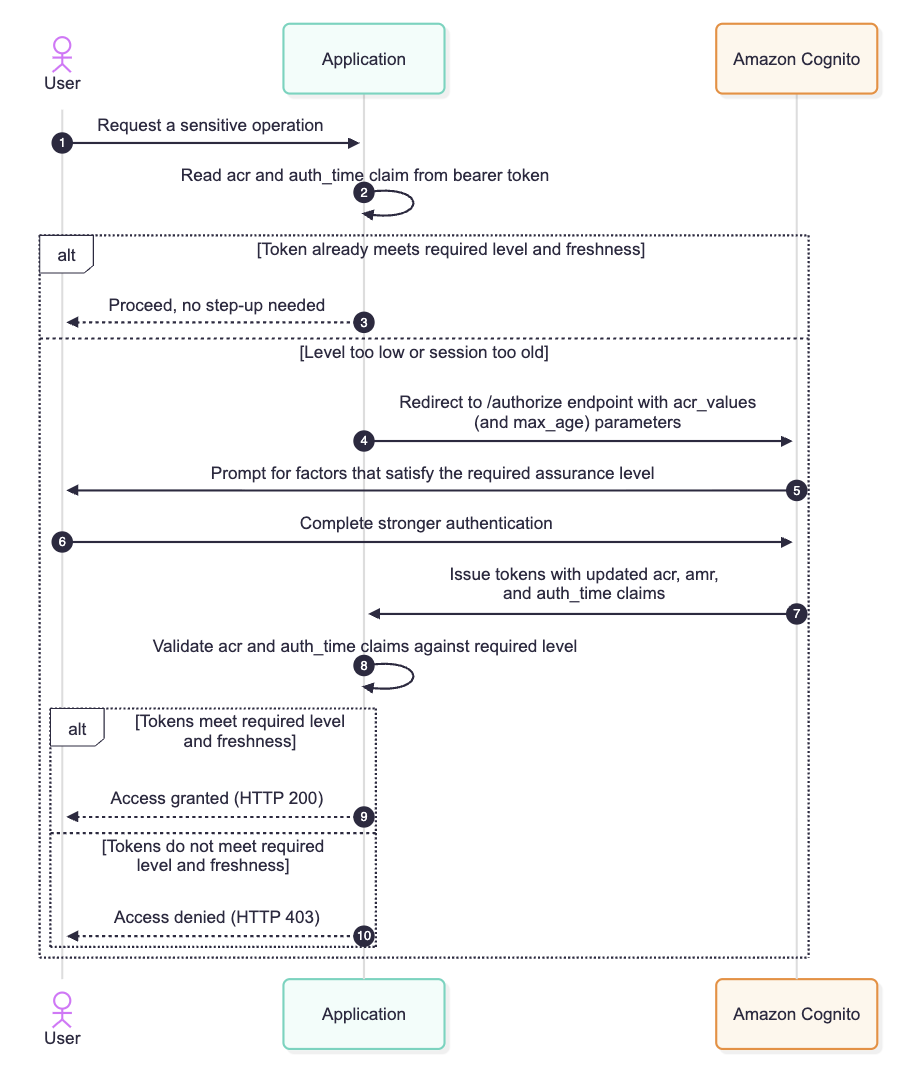
Figure 1: General step-up authentication flow to access a sensitive operation
How you request a level, and what stays your responsibility
The request side is deliberately straightforward. On managed login you add acr_values and optionally max_age to the or endpoint. In the SDK and API, you pass TARGET_ACR_VALUES and MAX_AGE in the USER_AUTH flow of the API. Both acr_values and TARGET_ACR_VALUES accept an ordered list of target levels. The same parameters work whether you’re setting the level for an initial sign-in or raising the level of a user who is already signed in; the patterns later in this post show both. Amazon Cognito acts only on what you send. It doesn’t infer the level you meant, so if you omit the parameter or request the wrong level, the user might not be stepped up the way you intended.
That points to the part your application and API owns: what assurance authentication level is needed. Amazon Cognito issues a token that honestly reports the level the user reached based on what your application requested. For example, deciding that a given operation requires an assurance level 3, checking the token’s acr against that requirement, and refusing the operation when it falls short is enforcement your application and API performs. Amazon Cognito produces the evidence; your code acts on it. In practice, that means checking the token you already hold before you redirect, so you don’t send a user to re-authenticate who already meets the bar, and validating the acr and auth_time claims on the tokens Amazon Cognito returns before you grant access. Amazon Cognito computes these claims itself, so you can’t customize, add to, or suppress them with a pre-token-generation Lambda trigger.
There is one more detail that saves debugging time later. If you rename your acr level URIs after tokens have already been issued, an older token might carry an acr value that no longer matches any configured level. Amazon Cognito treats that as an unrecognized level rather than an error. It still honors the token’s amr values and prompts only for factors not already present, without crediting any particular level. The amr list, in other words, remains meaningful even when a renamed level string goes stale. See Configuring ACR level names to learn how to configure this.
With the claims and the division of responsibility in place, the following four patterns show how they work in practice. Each one applies the same loop from Figure 1 to a different situation: a single application, a portfolio of applications, API-driven sign-in, and federation.
Pattern 1: Transaction-level step-up in a banking app
Consider a retail banking application. Signing in and viewing balances is routine, and the bank is comfortable requiring a moderate assurance level for it. Moving money is considered a privileged action, and a large transfer deserves stronger proof that the person at the keyboard is really the account holder.
The bank sets its baseline at level 2, so a user signs in with a one-time code over SMS or email and can see balances, statements, and pending transactions. When that same user initiates a transfer above $1,000, the application’s own policy says the operation requires level 4. Before it shows the transfer initiation screen, the application inspects the acr claim in the token it already holds. The user authenticated at level 2, level 2 is below the required level 4, so the application redirects the user to managed login with acr_values=urn:cognito:loa:4.
Amazon Cognito now requires the user to complete a factor combination that satisfies level 4, for example entering their password and then a TOTP code from their authenticator app. When authentication finishes, Amazon Cognito issues fresh tokens with acr set to urn:cognito:loa:4, amr set to ["pwd", "otp", "mfa"], and a fresh updated auth_time claim. The application validates that the new token meets its requirement and only then lets the transfer proceed. A transfer under the threshold never triggers any of this, so the everyday experience stays light and the friction lands exactly where the risk is.
The application logic reads naturally, here’s a pseudo JavaScript snippet:
You can extend the same idea to freshness. A bank might accept a level 4 session for a high-value transfer only if the user authenticated within the last 5 minutes, which you express by adding max_age=300 to the request. Amazon Cognito compares that window against the auth_time claim in the access token and reauthenticates the user if the window has passed, even if the token was refreshed seconds ago.
Pattern 2: A portfolio of applications with different risk postures
Assurance levels are just as useful across a set of applications as they are within one. Suppose an organization runs five applications from a single Amazon Cognito user pool using managed login, and each one carries a different risk posture.
An internal cafeteria menu is low risk, so it’s fine with level 1, password only. An employee directory and an expense viewer hold personal data but nothing that moves money, so they require level 2: a one-time code over SMS or email on top of the password. A source code portal warrants a passkey or a password plus a one-time code, which is level 3. The production financial console is the crown jewel, so it demands level 4: a password with a TOTP code.
Each application requests its own floor by setting acr_values to the level that matches its risk, and each validates the acr claim on the returned token before granting access. Because the applications share a user pool, managed login keeps a single sign-on (SSO) session across them. A user who has already reached level 4 for the financial console is redirected to managed login when they open another application, finds the existing session, and receives tokens for that application without another prompt, provided the application doesn’t send a max_age that the session has outlived. Each application then compares levels by rank, so a level 4 token satisfies a level 2 floor. Someone who signed in at level 1 for the cafeteria menu, on the other hand, is stepped up the first time they open the expense viewer, because level 1 doesn’t meet the level 2 floor that the application enforces. The user pool stays single and central; the assurance requirement travels with each application’s own policy.
Renaming the level URIs helps here. If the organization already classifies systems against an internal assurance standard, it can set AcrConfiguration on the user pool so that, say, level 3 reports as urn:example-corp:assurance:standard and level 4 as urn:example-corp:assurance:high. The factor combinations behind each level stay fixed; only the names change, so every application validates against strings its developers already recognize.
Pattern 3: Step-up on API and SDK sign-in
Managed login covers browser-based flows, including federation, but plenty of clients authenticate directly against the Amazon Cognito API, and the same assurance model applies there, such as using the USER_AUTH flow with the InitiateAuth API. This matters for a mobile app, a desktop client, or a service that drives sign-in programmatically and needs to raise assurance before a sensitive call.
Take a mobile trading app that signs its users in with the SDK. A user opens the app with a password and reaches level 1, which is enough to browse watchlists and market data. When they place a trade, the app’s policy requires level 4. Because the app authenticates through the API rather than a browser redirect, it starts a new USER_AUTH flow and passes the access token it already holds along with TARGET_ACR_VALUES, requesting the level it needs. Amazon Cognito drives the user through a factor combination that satisfies level 4, then returns tokens whose acr claim the app validates before it submits the order. The InitiateAuth request would look similar to the following API call.
Passing the access token the app already holds lets Amazon Cognito step the user up from the factors in that token; without it, Amazon Cognito authenticates the user from scratch. The MAX_AGE parameter behaves the same way it does on managed login. It ties the requirement to auth_time, so a trade placed after the window elapses forces a fresh authentication even if the app refreshed its tokens in the meantime. One behavior specific to the API path is worth knowing when you test on a lower Cognito feature plan. If you request step-up through InitiateAuth on a user pool that isn’t on the Essentials or Plus plan, the API returns a FeatureUnavailableInTierException. Managed login handles the same situation differently: the authorize endpoint silently ignores acr_values and proceeds with normal authentication rather than raising an error.
Pattern 4: Carrying assurance across a federated OIDC identity provider
The three patterns so far assume Amazon Cognito is where the user authenticates and the authoritative source for the identity. Many organizations federate sign-in to a third-party OIDC provider, so the person proving who they are is doing it against an external identity provider (IdP), while Amazon Cognito brokers the session. The assurance model follows them there.
When your application requests a level, it sends acr_values and optionally max_age to the Amazon Cognito authorize endpoint exactly as before. If that user is configured to federate through an OIDC IdP, Amazon Cognito sends the authorization request to that IdP on the user’s behalf. It translates the level you requested into the acr value the IdP expects, using the mapping you configured, and passes max_age along with it. A standards-compliant OIDC IdP honors acr_values the same way Amazon Cognito does: it drives the user through an authentication that satisfies the requested level, and it returns its own acr value describing what the user reached. max_age carries forward in the same way, so a freshness requirement is enforced at the provider that actually authenticates the user rather than being lost at the broker. Keep in mind that this is only supported with OIDC identity providers.
The request is unchanged from the application’s point of view. It still directs to Amazon Cognito:
The interaction gains a third participant, the downstream IdP, but the assurance requirement is persisted through the entire federated authentication flow as shown in figure 2.
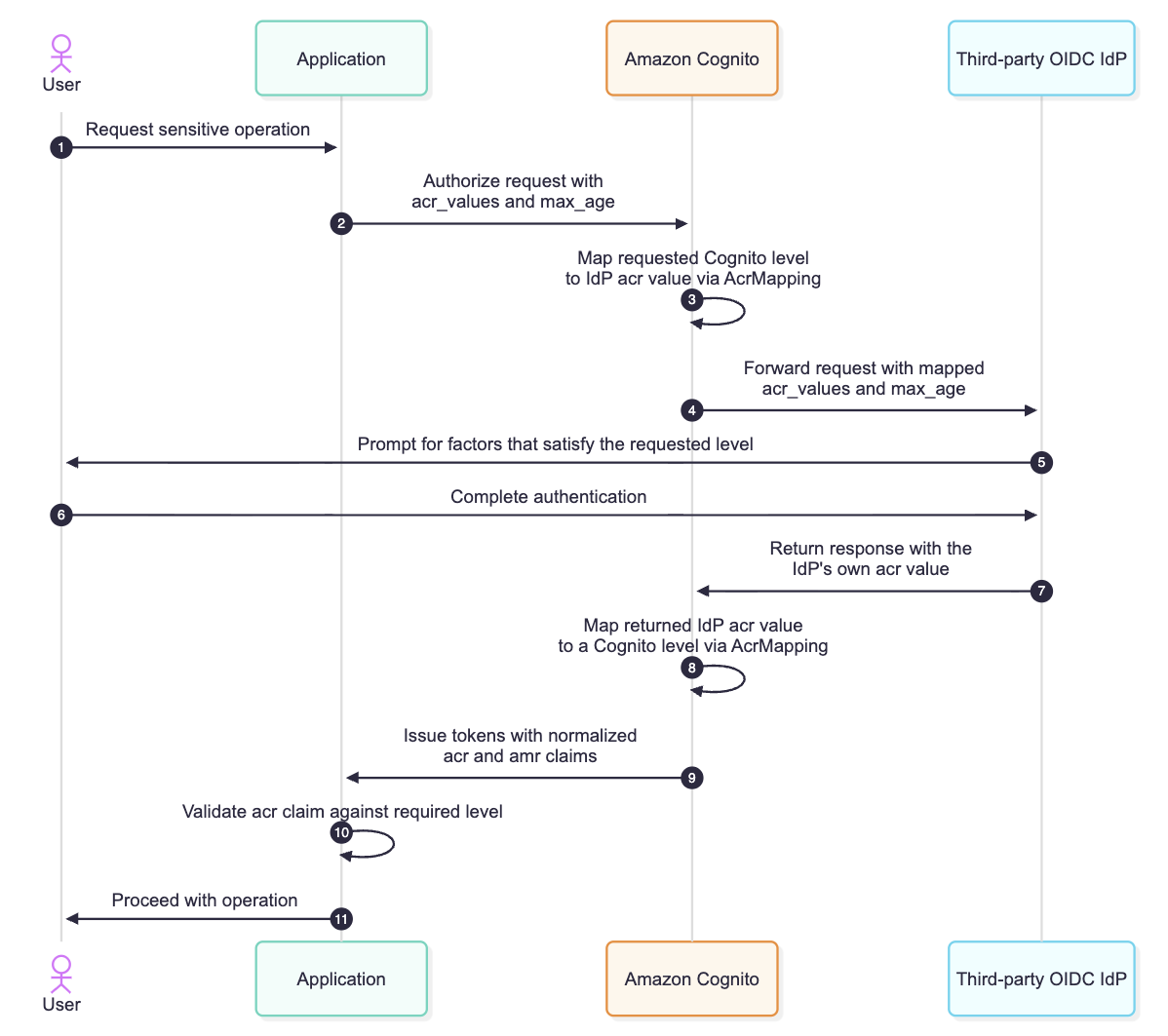
Figure 2: Federation with an OIDC third-party IdP, persisting the acr_values and max_age request parameters
The value that comes back from a partner IdP won’t use Amazon Cognito’s level URIs, so this lets you map the provider’s acr values onto its own levels with the AcrMapping field on the OIDC IdP configuration. A partner IdP that reports, say, https://partner.example/assurance/strong can be mapped to Amazon Cognito level 3 (urn:cognito:loa:3), so that by the time the token reaches your application the acr claim speaks the same vocabulary regardless of whether the user authenticated locally or through a federated provider. Your resource server keeps a single enforcement rule and authorization logic and doesn’t need to have special handling depending on where the user ultimately authenticated. See Step-up authentication for federated users to learn how to map external OIDC IdP acr levels to Cognito.
This is the same pattern that RFC 9470, the OAuth 2.0 Step Up Authentication Challenge Protocol, describes: the assurance level is requested at the edge of your application, travels through Amazon Cognito to whatever provider authenticates the user, and returns normalized to a vocabulary your code already understands. A user federating from a corporate IdP and a user signing in against the same user pool directly both arrive at your resource server carrying an acr claim that means the same thing.
Conclusion
In this post, I showed you how the acr and amr claims in Amazon Cognito let you match authentication strength to the risk of what a user is doing, instead of settling for one bar at the front door. Your application requests a target level with acr_values and max_age (or TARGET_ACR_VALUES and MAX_AGE in the USER_AUTH flow), Amazon Cognito reports the level reached and the methods used, and your application enforces what each operation requires. The four patterns, from a banking transfer to a federated third-party IdP, follow that same loop, and one enforcement rule at your resource server covers every sign-in path.
The larger shift is that assurance is now something Amazon Cognito expresses in a standard way and your application reasons about directly, without building your own step-up tracking. To get started, move your user pool to the Essentials or Plus feature plan, decide the level each operation requires, and add acr_values to your existing authorize requests. For the complete parameter reference and federated behavior, see the Amazon Cognito Developer Guide.
If you have questions about this post, contact AWS Support or start a new thread on AWS re:Post.


