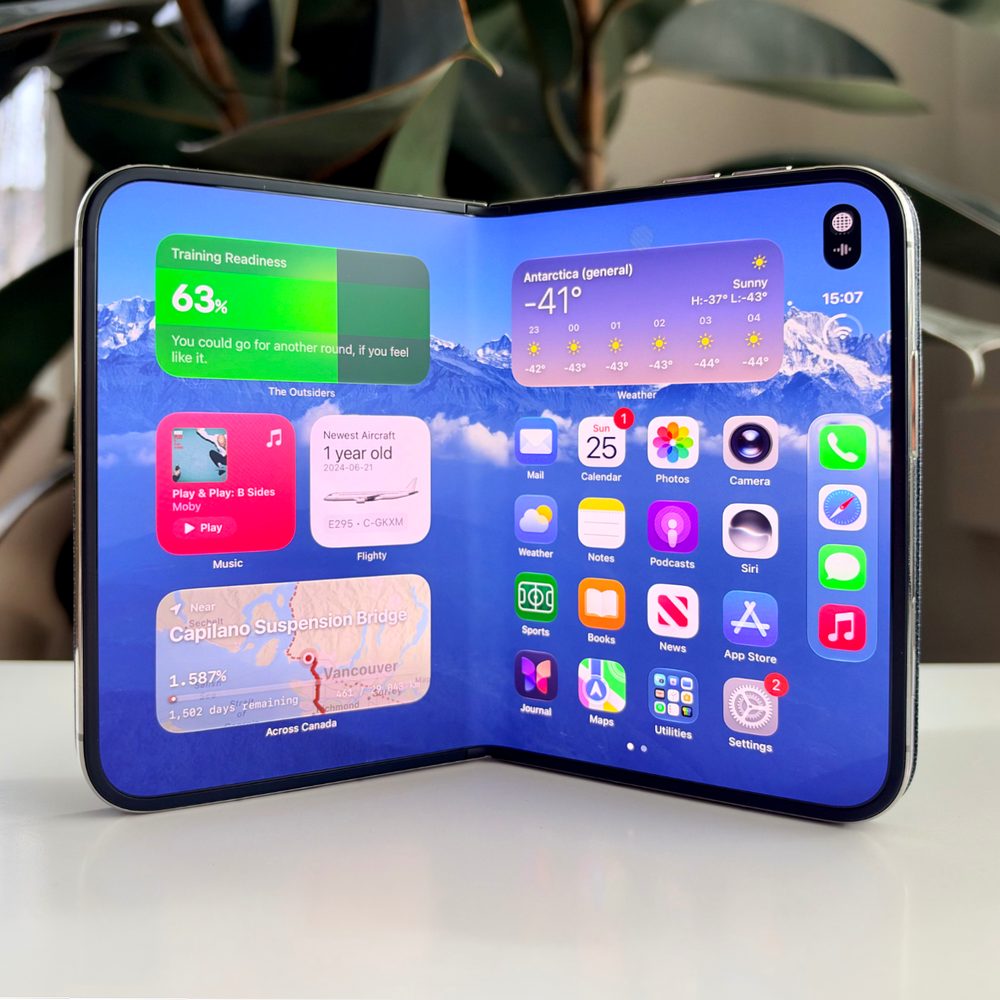
MY Unfolding thoughts on the iPhone Duo.
I’m not a reviewer, but I do have an iPhone Duo. And with everything else going on in life, I haven’t/won’t have the time to really sit down and put together my thoughts on this radical new iPhone from Apple. So I figured I’d document them as I go: a week of unorganized impressions, random observations, and evolving thoughts on the Duo. Enjoy!
My Duo Config: I picked up the 512GB iPhone Duo in Star White, along with the Navy Blue iPhone Duo Folio with Kickstand. I also added the PopSockets Low-Pro Grip for MagSafe Ultra Thin Phone Grip and Stand (what a mouthful).
Disclaimer: This is the first foldable device I’ve owned, or even spent much time with (Nintendo DS excluded). So I’m discovering what it means to use and live with a foldable phone for the very first time, even though it’s already a small but mature market on the Android side.
Friday, October 23
Long Day: I arrived at the Apple Store at 19:00 after a 10-hour transatlantic flight. By the time I had my Duo in hand, I was somewhere around my 27th hour awake, so all I managed was an unboxing in a jet-lagged haze and the start of setup (I opted for a fresh install).
Crowd: Even at 19:00, the Duo table at my tiny mall Apple Store was packed. Easily 20–30 people were gathered around the Duos in an otherwise thinning-out store. And this wasn’t an “oh, you look like tech people” crowd. It was regular-looking people of all ages, notably skewing female, playing with the demo units. There seems to be a palpable excitement for this iPhone that extends beyond the tech community, something I didn’t see when I visited an Apple Store for the Vision Pro launch.
Saturday, October 24
Since I passed out the night before, Saturday was the day I really got a chance to really setup and play with the device for any length of time. Here are some of my observations from Saturday:
Heat - Take I: The Duo gets hot. I’m coming from an iPhone 17 Pro Max, which handles heat dramatically better. But even compared to the iPhone Air, which also gets really hot, the Duo’s smaller size means you’re in contact with the hottest parts of the device far more often, especially when it’s folded.
Folio with Kickstand: Generally, I’m very bullish on the folio case. It’s light, and I like that it protects the front display and hinge of the Duo. My main gripe is the price, $129 is way too much. Kickstand is really thin and well integrated into the back - it’s held down magnetically and requires a tiny bit of pressure to lift from the case, creating a simple stand whether the Duo is open or closed.
Oh, and the folio cover locks the iPhone when you close it. Without the cover, you have to lock it manually after folding it shut, though there are shortcuts to change that behaviour.
iPhone Duo Case: I passed on this one because I wanted hinge protection and the flexibility to switch cases. The polycarbonate cases use adhesive to stay attached, so I imagine they aren’t designed to be taken on and off regularly.
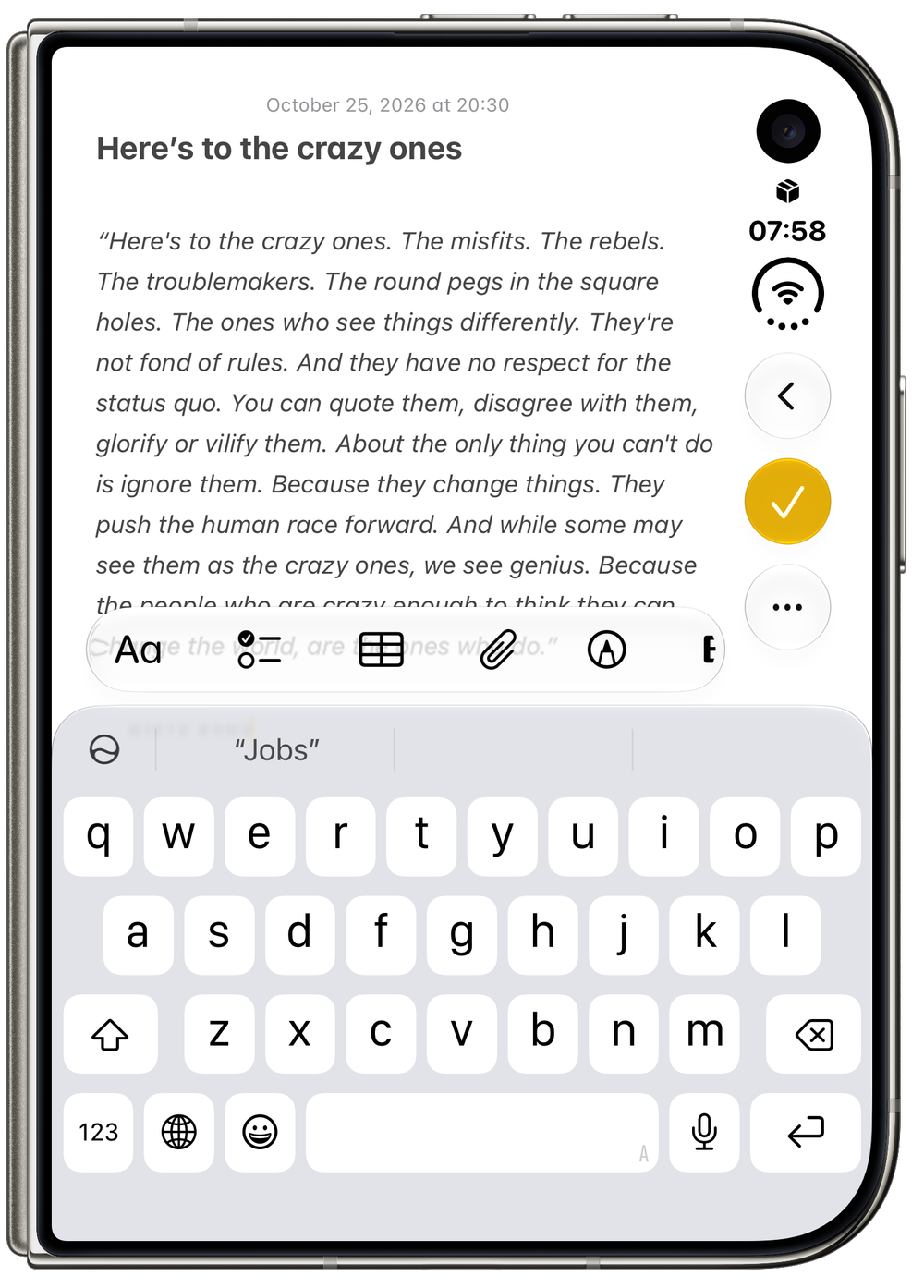
Outer Display - Take I: Honestly adorable. I love how compact the display is, but usability takes a pretty big hit. As much as I want to use the Duo closed, the screen feels too crowded to get things done comfortably. For most tasks, it feels like I’m forcing the issue, with the phone constantly nudging me to unfold it. Basic tasks like checking the weather, finding a podcast, or viewing the calendar all work fine. But anything that requires text input cuts the usable display in half, leaving only a few visible lines above the keyboard. Using the smallest text size helps, but the larger you need the text to be, the more cramped the outer display will feel.
Currently, I’d say I’m using the outer display about 65% of the time, baptism by fire, as I’m really trying to force myself to get used to it.

Example of using the outer display with the onscreen keyboard deployed, and how content can begin to feel slightly cramped.
Chonky: The iPhone Duo feels heavy, especially when folded. Packing that weight into such a compact form makes it feel much heavier than the 17 or 18 Pro Max, even though it weighs just 5 grams more than the latter. Still, it’s Apple’s heaviest iPhone at 254 grams (8.96 ounces).
Folding: As someone with no experience with foldables, folding the Duo feels abhorrent, an affront to the laws of nature. I’m only 50–60 folds in, but I’m still internally screaming every time I open or close it. The hinge is very smooth, though it takes more force to open/close the Duo than I expected. But that resistance lets me precisely adjust the angle without it feeling loose or like it’s about to snap into place.
Sunday, October 25
Winter Phone: We just got our first snowfall, and I’m beginning to wonder how the Duo will handle winter. Touch ID is DOA with gloves, so Apple Watch unlocking will be a necessity. I’m also curious how the folding screen and adhesives will tolerate temperatures of −10, −20, or −30°C. Cold can make foldable displays more brittle, increasing the risk of cracking. Apple’s website lists the same operating ambient temperature range for the Duo as the iPhone 18 Pro: 0° to 35°C (32° to 95°F). Personally, I’ll be extra cautious about taking the Duo out in below-freezing temperatures and keeping my use brief when I do.
Crackgate: I would be remiss if I didn’t address “Crackgate”: reports from some users that their iPhone Duo resists being opened, something snaps, and a distinctive glowing line of damaged pixels appears across the lower portion of the display. God knows how many cases there are, or will be, and the internet is certainly amplifying the issue right now, but reports suggest it tends to happen within the first few hours of use.
It doesn’t seem to come down to how many times you fold the device. Reviewers have already gone ape, folding and unfolding their Duos tens of thousands of times to see how they hold up. Given that the damage appears in the same spot on affected devices, and so soon after people begin using them, the pattern seems to point to some kind of material defect.
What we don’t yet know is how widespread this actually is. I’ve seen maybe 30–40 reports across Reddit and TikTok, out of what I’d guess is a million or two Duos sold this weekend. Obviously, I’m guessing on sales, and counting social media posts isn’t going to give us an actual failure rate. So far, the number of reports I’ve seen is small, but it’s too early to know if it’ll stay that way.
Don’t get me wrong, this is concerning. Something is clearly going wrong with some of these devices, and it definitely has me anxious about my own Duo. But figuring out how big an issue this is will take time. Last year, there was a whole uproar over iPhone 17 Pro durability that fizzled out within a week. That doesn’t mean this will play out the same way, but how loud the internet gets about something doesn’t necessarily tell us how common it is.
At least reports seem to suggest Apple is being very accommodating to returns, with several users quickly getting a replacement device on site when visiting the Apple Store.
Matte Display: This is the first Apple product I’ve owned with a nano-texture display, and I really like how it feels. “Grippy” probably isn’t the right word, but there’s something about the matte finish that makes my taps and swipes feel more precise than they do on slippery glass. Apple used this finish to help disguise the foldable’s crease, and the results are pretty impressive. From normal viewing angles, I can’t see it at all, though I can still feel it when I slide my finger across it. The texture also does a great job of diffusing glare, making the display really nice to use in sunlight. The tradeoff, of course, is slightly more muted colours on the inner display. They just don’t have the same richness and punch as they do on regular glass. On another device, you’d probably stop noticing after a while, but because you’re constantly switching between the inner and outer displays, the difference is harder to ignore.
November 13 Update: Apple should’ve included a Polishing Cloth in the box with the iPhone Duo, as it works wonders at removing finger oil from the matte display and titanium rails. If you get this phone, don’t leave the store without a cloth.
Lefty: Several reviews have noted that the iPhone Duo’s design favours right-handed people, and that’s probably true. But the world has always been a harder place for us left-handed folk.
In your right hand, the physical buttons, the dock along the right edge of the display, and app controls like Safari’s navigation and tab buttons are all easier to reach. In my left, those same controls require a bit of a stretch, so I naturally find myself using both hands more often.
Between that extra reach and the Duo’s weight, two-handed use feels more comfortable even when it’s folded. I suspect I’d feel the same way if I were right-handed (God forbid). Unfold it, though, and it becomes a two-handed device almost by default, so my complaints disappear.
And against my palm, the “sharper” bottom-left edge feels no less comfortable than the more rounded edge on the right.
Monday, October 26
Today was my first day back to work, and I got to use the iPhone Duo as my iPhone in a routine weekday environment.
Commute: I know you shouldn’t use your cellphone while driving, but man, it’s even harder with the Duo. The extra width compared to a slab iPhone and the more cumbersome one-handed operation make it especially awkward to use behind the wheel. If you want to make sure you never use your phone in a vehicle, the Duo might be that device.
Tough Compare: The main thought I’ve been having since getting the Duo on Friday is how difficult it is to form an unbiased impression because of how easy it is to draw comparisons to other iPhones. iOS is nearly two decades old and has seen year after year of refinement to make it as optimized as possible for a slate phone. The iPhone Duo, on the other hand, borrows a lot of those conventions while adding a few new approaches to navigation.
As a result, the janky parts of using this new form factor seem more prominent at first. Things like the physical button placement, which can be awkward, the cramped navigation of the outer screen, and the placement of on-screen buttons take more getting used to than I thought they would when I first saw the phone.
I’m relearning a lot of small conventions across all my apps. This feels cumbersome, and I think it also influences my initial reaction to this sort of device.
Battery Life - Part I: Most of my workday has been spent using just the outer display, with the always-on screen enabled. I’ve had two hours of screen-on time today, with a mix of listening to music and podcasts, doing some light photo editing and browsing, social media, and updating my calendar and reminders. It’s currently 2 p.m., and I’m sitting at 81 percent battery.
TouchID: This is undoubtedly a regression. After nearly a decade of using Face ID on an iPhone, it’s hard to replace that muscle memory with Touch ID, even though I use Touch ID on my iPad mini. From my experience, Touch ID is slower, a bit more error prone, and at the moment, not as seamless as Face ID. It’s annoying, but like a 3 out of 10 annoying.
Having an Apple Watch for unlocking makes the process a little easier, and I’ve also experimented with registering my palm for Touch ID using a process posted on Reddit. I’ve had moderate success getting the phone to unlock when I pick it up, although I’m still tweaking the exact placement of my palm and how I pick up the device.
Wednesday, October 28
The Era of Fun Apps is Back: Back when the App Store launched on the iPhone, there was a surge of cheeky, silly novelty apps. Things like iBeer, which showed a mock pint of beer that would disappear as you tilted your phone, virtual razors, Zippo lighters, lightsabers, bubble-popping apps, and so much more. They were fun, simple, whimsical little apps that took advantage of this new technology in playful and endearing ways.
But as the iPhone and App Store matured, the novelty of these apps largely wore off, and this short-lived period of whimsy was forgotten.
Now, with the iPhone Duo, I’m already seeing a resurgence of whimsical apps that take advantage of its form factor and functionality. Take Toastie, for example, an app where you’re tasked with preparing sandwiches against the clock. You grill them by closing the iPhone Duo like a sandwich press, guesstimate how long they’ve been cooking, and open it back up to see if you’ve toasted your sandwiches just right.
Or Tiny Computers, where you prop the iPhone Duo into “laptop mode” and get to play around with these little pseudo-emulations of older operating systems. Or Deck-Man, an app that replicates a cassette player. Unfolded, you can pick through your music. Then, by closing the Duo, you get this Walkman-like experience of seeing your cassette and controlling your music.
That’s one of the things I’ve really enjoyed about the Duo: getting to re-experience this sense of fun in app development that hasn’t been there for a long time.
Non-Optimized Applications: It’s definitely true that, in these early days of the iPhone Duo, apps that haven’t been updated for 27.0 look pretty terrible. Essentially, you get the app dead centre on the screen, surrounded by two massive black blocks when you hold the device in landscape. Things improve if the app has been built with Xcode 27, even if it hasn’t been specifically optimized for the Duo, because it automatically inherits the ability to fill more of that space thanks to Apple’s support for variable app sizes. But when an app has been specifically updated for the iPhone Duo, it can honestly look terrific.
So for early adopters, it might be a frustrating couple of months, especially if some of your favourite or most important apps haven’t been optimized for the Duo yet. But I imagine this will become a smaller and smaller concern with each passing day, especially as developers move to the latest Xcode and their apps pick up many improvements automatically. As of late October, I’d say about half the apps I use regularly, including Audible, language learning apps like Anki, Migaku, and Duolingo, my banking app, and various sports apps, still haven’t been updated for iOS 27, so they get the black blocks of shame treatment.
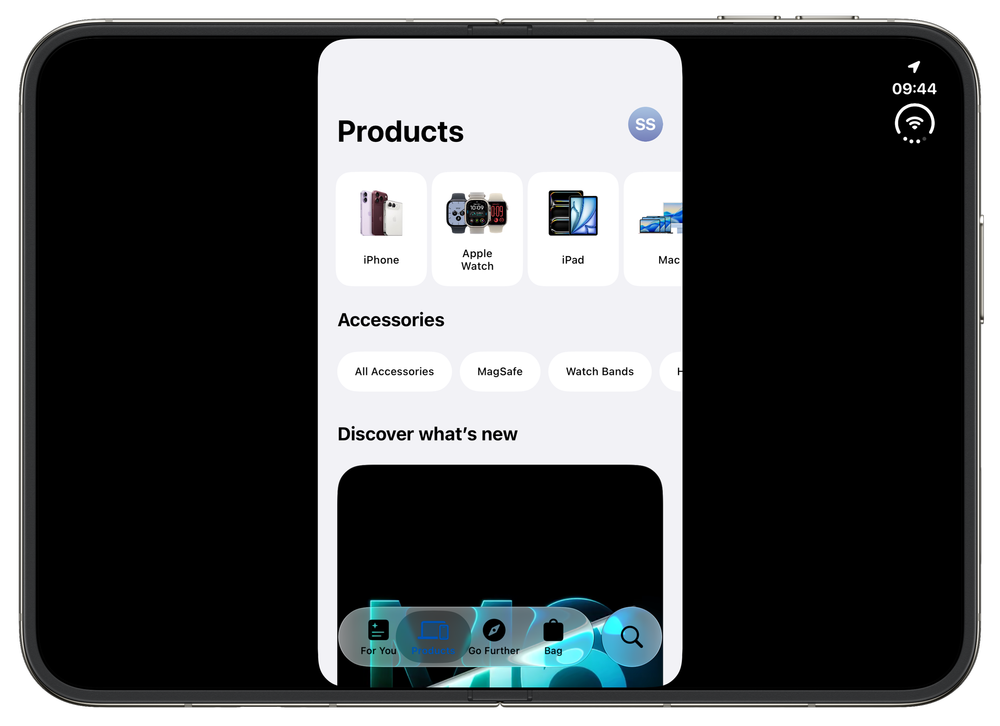
There’s no two ways around it: non-optimized apps, especially when used full screen, look awful. This is the Apple Store app on Octoer 28, 2026.
Saturday, October 31
Lack of Telephoto: This is one area where I’m still struggling with the iPhone Duo. I take a lot of telephoto photos with my iPhone. Of the 26,916 photos I’ve taken since 2021 (when I got a 3x telephoto Pro Max), 4,950 (18.4%) were shot using the telephoto camera.
I still haven’t decided how I’ll adapt, whether that means carrying a separate telephoto camera, holding onto an iPhone with a dedicated telephoto lens, or simply sucking it up for a year.
If you're curious how often you use your iPhone's telephoto camera, and how much you might miss it, you can get a rough idea by creating a Smart Album in Photos on your Mac with Match all of the following conditions:
Camera Model → includes → iPhone
Focal Length → is in the range → 7.5mm to 17mm
This should capture many photos taken with the dedicated telephoto cameras on iPhone models, while excluding other camera brands and most photos taken with the main and ultra-wide cameras.

Mt. Rainier taken on an iPhone 17 Pro Max - August 31, 2026
The Crease: The crease is a non-issue. The nano-texture finish makes it practically invisible in nearly all conditions, and I only really notice it if I hold the phone at a weird angle or run my finger over it. Durability tests involving more than 250,000 folds (that’s 68 folds a day for 10 years) show that the crease deepens to a point and then stops getting worse. But this is academic. No one is going to hold onto this phone for 10 years and be disappointed that, after all that use, their folding display has a slightly deeper crease down the middle than it did out of the box.
Fingerprint Magnet: Because I’m using the iPhone Duo with the Folio kickstand case, the titanium rails are exposed. Having always used a case that covers the rails, I’m stunned by how much of a fingerprint magnet those polished titanium sides are. I’d advise either developing a psychologically healthy level of tolerance for seeing your device covered in fingerprints or buying a polishing cloth when you pick up your Duo. Greasy fingerprints also show up on the inner display, where they’re a bit more stubborn to clean off. Again, an Apple Polishing Cloth is your friend.
Outer Display - Take II: I wrote early in the week about how cramped the front display initially felt, but as the week progressed, I found myself adjusting to it to the point where the size no longer bothers me. In fact, I might actually prefer it. And when I go back to a regular iPhone, it feels comically elongated. The Duo is still almost exclusively a two-handed experience, though, unlike other iPhones, which I can comfortably and confidently use one-handed much of the time.
Precious: I’m still very careful with the Duo. It feels very precious, and its cost is still very much at the forefront of my mind. This is a personal hangup. Other people have shown that the Duo is a durable phone that doesn’t need to be babied. But if you have a neurotic predisposition, handling and using a phone like the Duo while out and about might come with a bit of extra nervousness. I don’t feel that with other iPhones, and I might not feel this way forever, but one week in, that feeling hasn’t begun to recede.
November 13 Update: This hasn’t changed, this phone still feels very precious, and I’m reluctant to take it out and handle it while walking the dog or moving about. For me, this is very much a “stop what you’re doing and use the device” kind of phone.
One Week In: It’s been a full week with the iPhone Duo, and my thoughts and impressions continue to change. But perhaps what I can say most confidently is that I’m really enjoying how different this iPhone feels from any other iPhone I’ve ever used. It’s Apple’s most radical iPhone since the original, and getting to explore and play with something this novel scratches a very techy itch for me. How long this feeling will last remains to be seen, but I continue to look for, and look forward to, opportunities to use the Duo. It’s just delightful to use, whether open or closed.
Sunday, November 01
Shortcuts: One of the fun and whimsical things you can do with the iPhone Duo is set shortcuts for when you open and close it. So naturally, I had to add that classic 1980s Transformers sound, like all the little parts are shifting, folding and locking into place. Now every time I open or close my Duo, it sounds like an Autobot transforming.
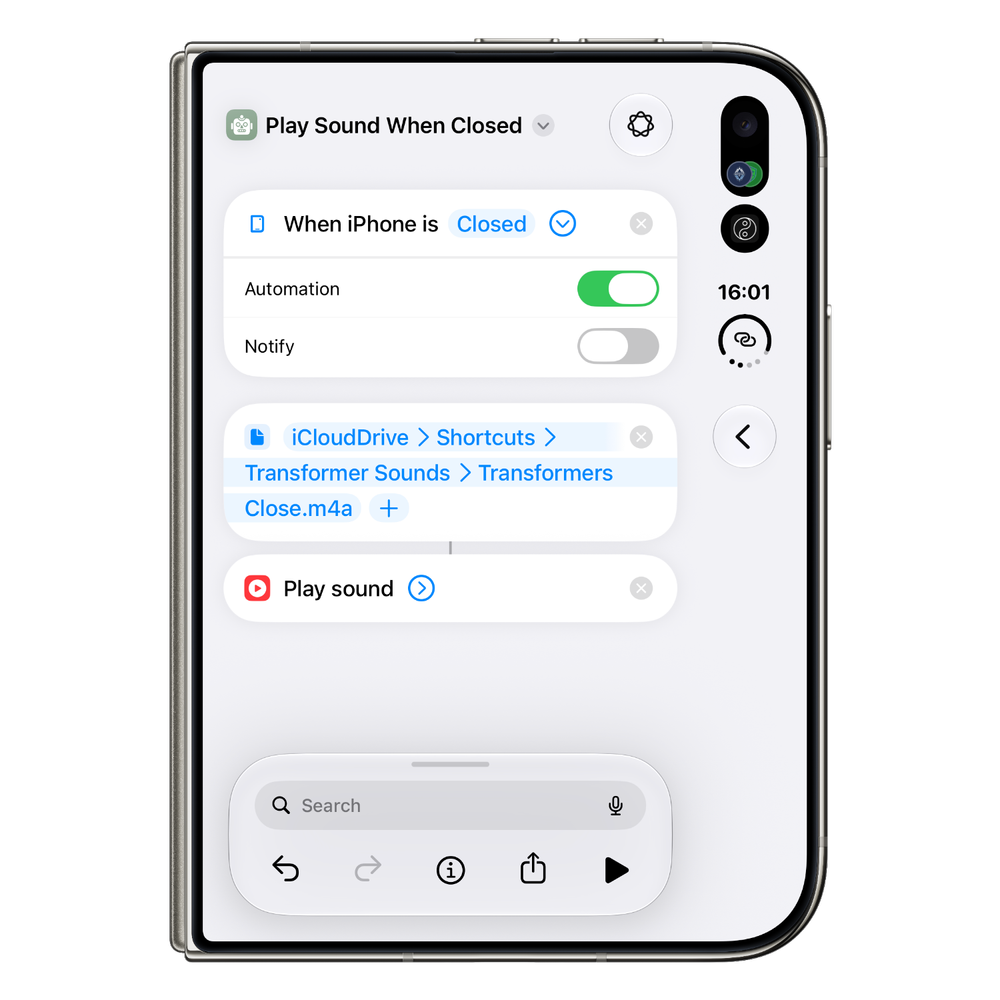
Simple three step shortcut to add opening/closing sounds to your iPhone Duo.
Super easy to do (this is coming from BasicAppleGuy, after all). Just download these two sounds, save them in a folder, and set up “When iPhone Is Open” and “When iPhone Is Closed” automations, linking each one to the matching sound.
Wednesday, November 04
Avoid r/iPhoneDuo: Do yourself a favour and stay away from the iPhone Duo subreddit. It's a fantastic way to give yourself a tremendous amount of anxiety about owning the device. Yes, there appear to be some cases of hinges failing and damaging the display within the first 1–5 days of use, but spending too much time in that subreddit is a surefire way to convince yourself that your iPhone is next. Sometimes ignorance really is bliss, and there's no sense letting a subreddit rob you of the enjoyment of your new device.
Thursday, November 05
Keyboards: There are eight different keyboard layouts on the iPhone Duo. Not 1, not 2, not 3, not 4, not 5, not 6, not 7, but 8 different layouts.
There's outer-closed landscape, outer-closed portrait, inner-open landscape split (that weird split keyboard with two Gs and two Vs), inner-open landscape, inner-open portrait, inner-partially open portrait (which actually has taller keys than the fully open portrait keyboard), and finally, outer-closed portrait with the keyboard compressed to the left or right for one-handed typing.
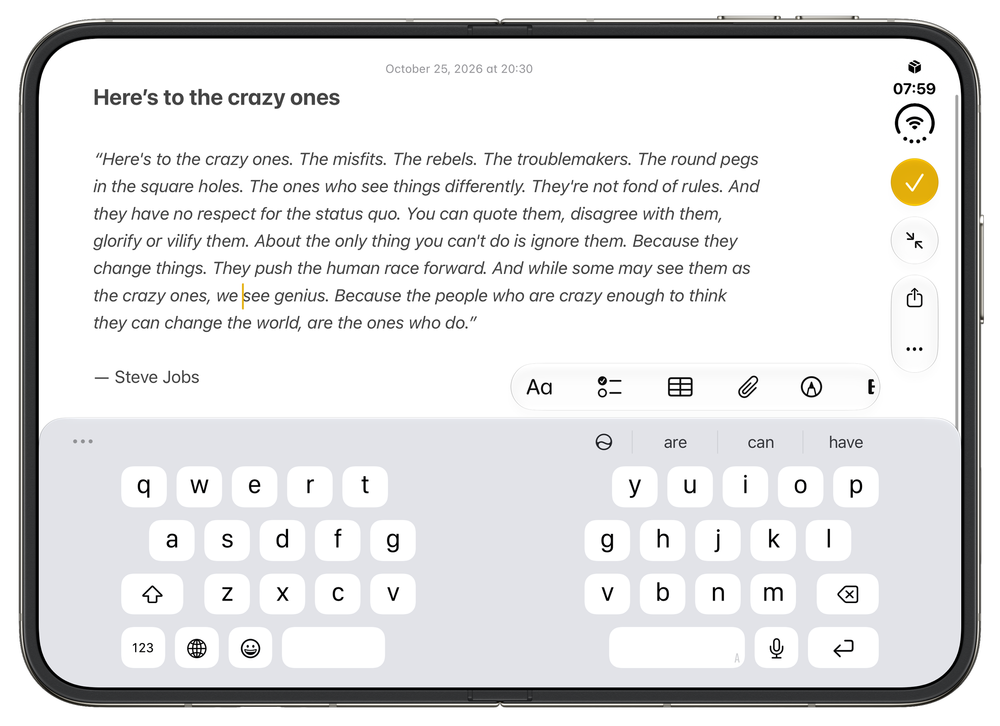
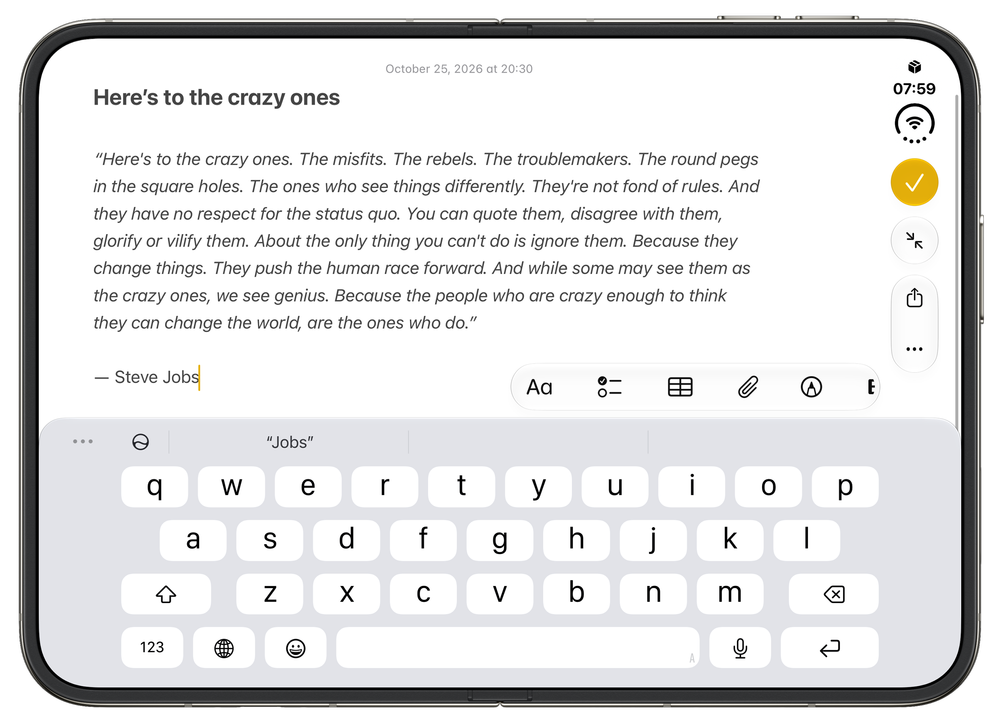
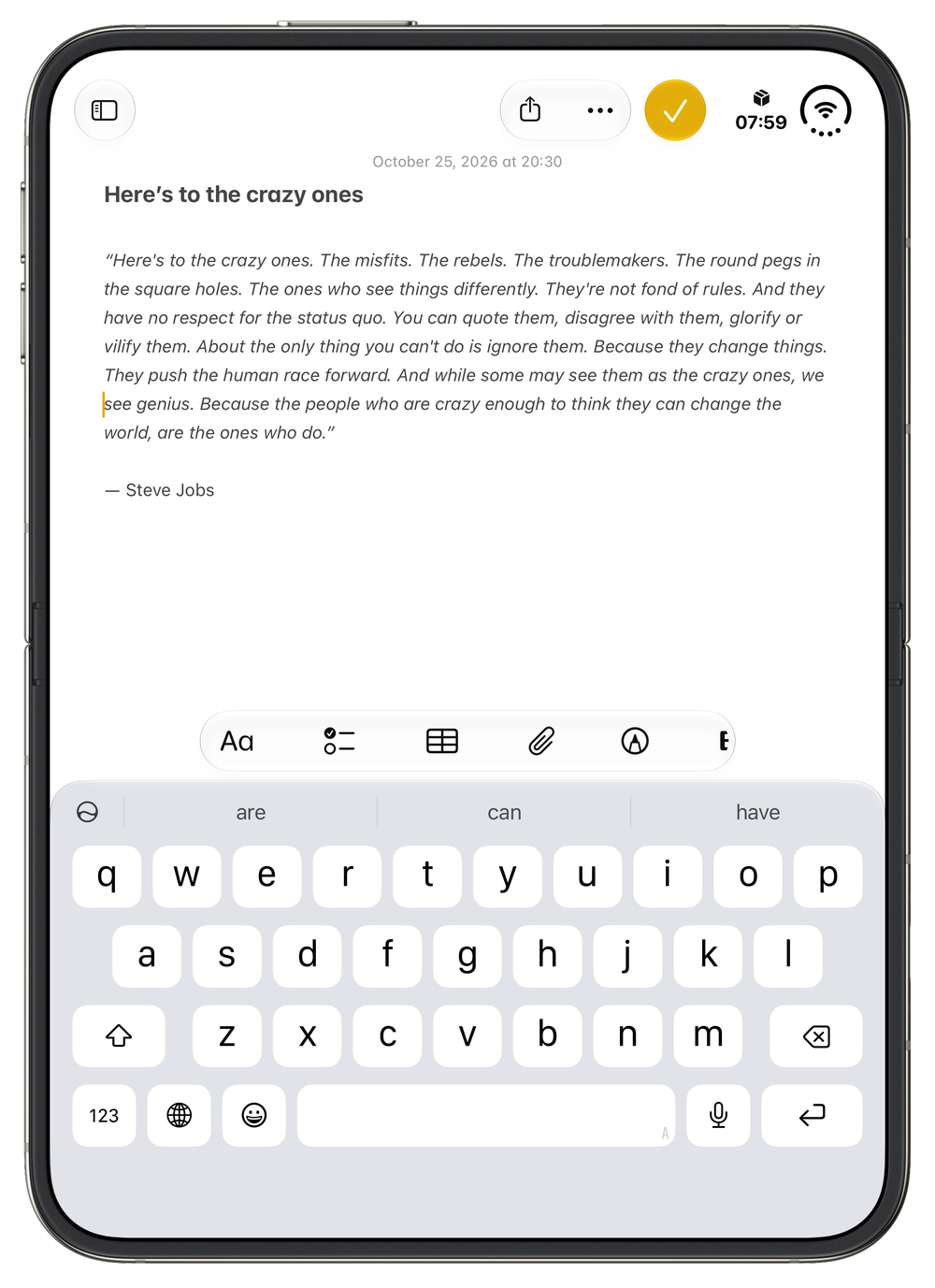
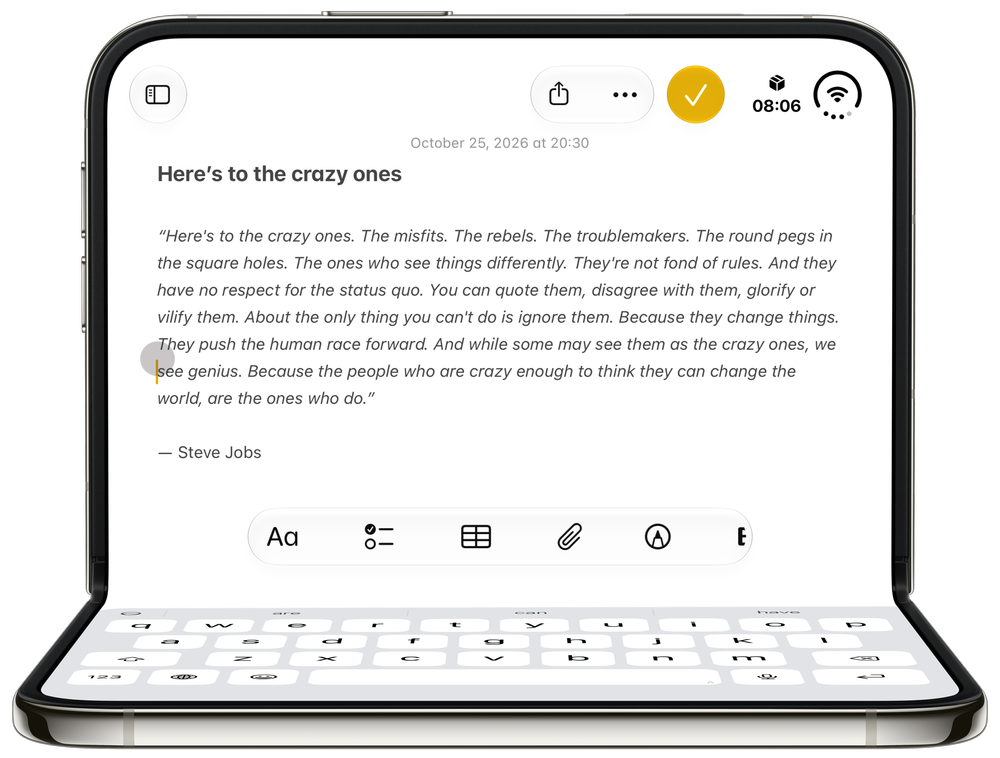
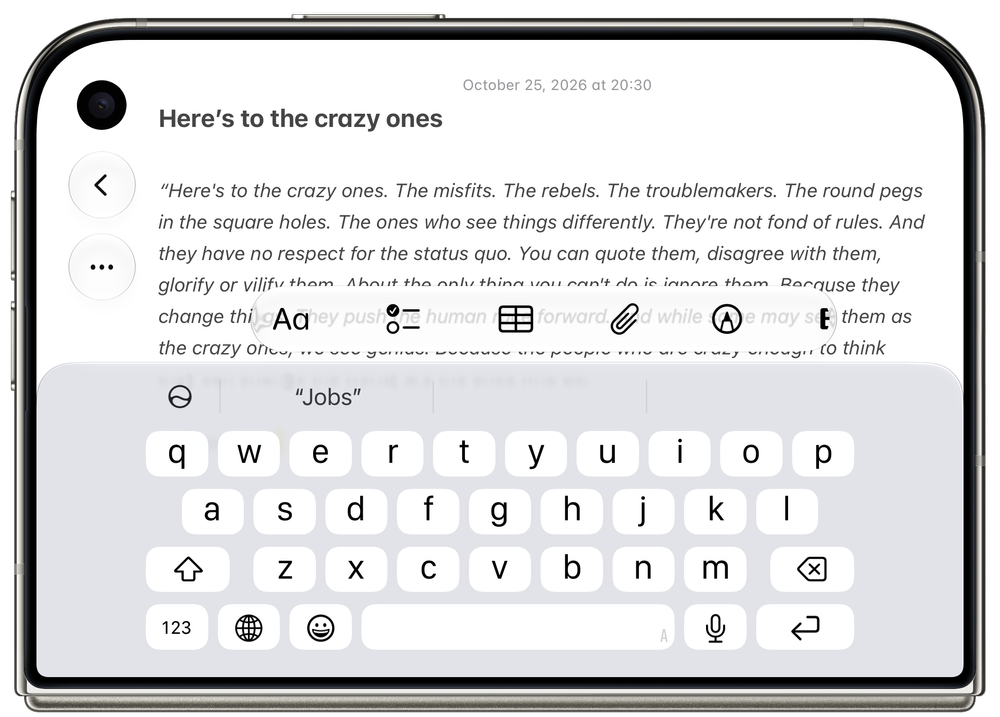
It's all a bit ridiculous, even if it does make sense. But to be honest, aside from the inner-open landscape keyboard, I find them all pretty decent, and switching between them hasn't been particularly difficult to adjust to.
One thing that has surprised me is just how pleasant it is to type with two hands when the Duo is closed. I've heard someone compare it to typing on an old BlackBerry, and I can see where they're coming from. Something about the spacing of the keys and the way you grip the phone makes typing in this mode surprisingly comfortable. It's a little underrated, actually.
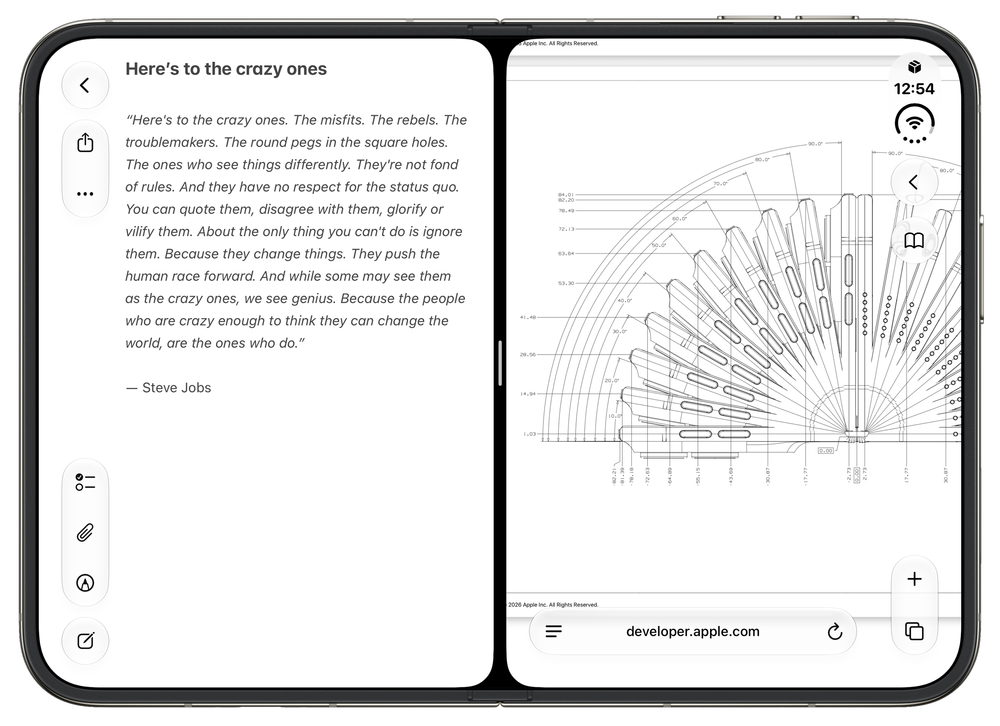
Multi-tasking on an iPhone?! Notes on the left, Safari with a PDF open on the right.
Multi-Tasking is Gas: I think one of the reasons I still carry around an iPad Mini in my everyday carry is that it allows me to have two apps open side by side. And the Duo handles this beautifully. It's dead simple to put an application on either side of the display and do things like compose an email while looking at my calendar, or open a website and drag a URL directly into Notes. It's such a simple thing, but having two full applications open next to each other on a device that fits in my pocket is absolutely fantastic. I love it.
FaceTime Camera: Apple refers to the under-display camera on the iPhone Duo as a FaceTime Camera, which is code for a camera that's good enough for FaceTime calls. And that's about it. Don't expect this camera to make you look your best. Don't expect it to look particularly good in low-light conditions. Expect it to show your face to another person during a video call, and little more. For anything beyond that, use the outer cameras, which are far better (12–48MP) and can do the heavy lifting.
Friday, November 13
It’s been a minute since I last wrote, but behind the scenes, life is a bit upside down for me at the moment. A lot of added and unexpected stress has fallen on my shoulders, taking time and energy away from nearly everything else. I’ll probably add a few more mini posts to this entry and conclude it by week’s end with my overarching first wave of thoughts on the iPhone Duo.
Foldin’ Foldin’ Foldin’: Recently, CNET put its iPhone Duo review unit through over 450,000 folds across 20+ days, and only at that point did the hinge begin to break down. CNET reported that the “iPhone Duo was not opening with the same firm sound I was used to hearing” and that “the screen no longer opens all the way flat. Instead, it unfolds most of the way but leaves a few degrees of angle in the hinge.”
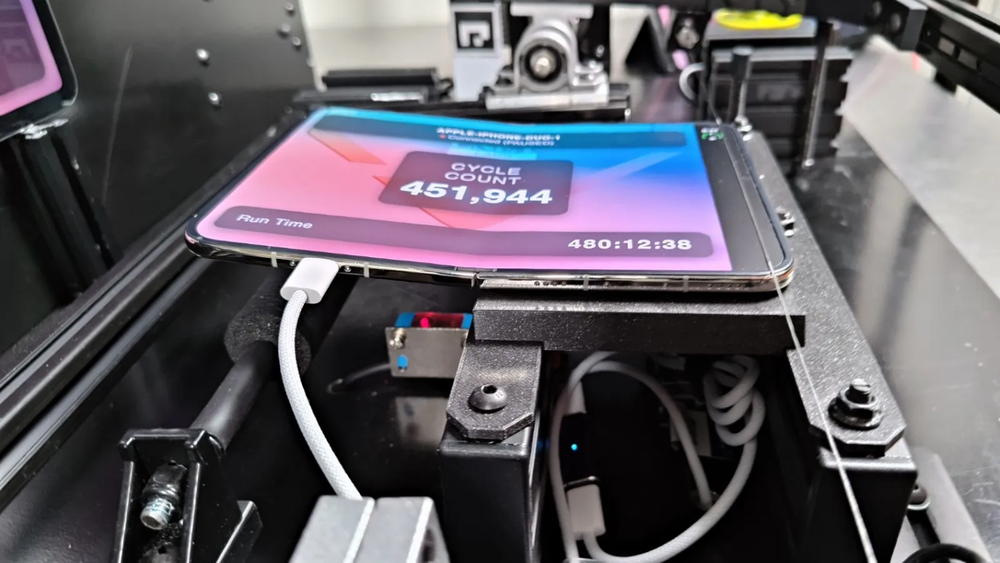
After 450,000 folds, the iPhone hinge began to break down. Photo Credit: CNET
This is reassuring, not because I think I’ll ever reach 450,000 folds, but because it speaks to the hinge’s durability over time. Obviously, this was a pretty sterile testing environment, but it’s impressive nevertheless.
For fun, I worked out how many folds per day it would take to reach 450,000:
1 year: 1,233 folds/day
3 years: 411 folds/day
5 years: 247 folds/day
10 years: 123 folds/day
20 years: 62 folds/day
50 years: 25 folds/day
100 years: 12 folds/day
But if you’re a neurotic battery checker looking for another way to disquiet your mind, you might like these shortcuts from Stephen Robles that track how many times you fold your iPhone Duo.
Who wants a stylus?: When Steve Jobs introduced the iPhone in 2007, he dismissed the idea of a stylus: “Who wants a stylus? You have to get ’em and put ’em away, and you lose ’em. Yuck. Nobody wants a stylus.”
For nearly two decades, the iPhone went without stylus support, until the Duo. It supports the USB-C Apple Pencil, and I have to admit that I’m a massive fan of using the Pencil as an input device on both the inner and outer displays. I’m gentle beyond reason on the inner display, although it seems pretty durable.
No fancy use case, but I often have the Duo propped up beside me at work, and I like using the Pencil to scroll, open content, interact with controls, and so on. It’s a pain to remember to charge, and the Pencil seems to forget my Duo more often than I’d like, but I’m not as hostile to the idea as I thought I’d be.
Last Edited: Thursday, November 13 @ 21:16


